


Download XviD Video Codec – Video Format Support, Compression, Customization
Overview
The XviD Video Codec is a utility application designed to enhance video playback capabilities on mobile devices by supporting a wide range of video formats. It addresses the common issue of video compatibility, allowing users to view files that are otherwise unplayable on their smartphones or tablets. The app is particularly beneficial for users who frequently transfer videos from different sources, such as from computers, cameras, or online platforms, where file formats may vary.
By integrating advanced decoding and encoding features, XviD Video Codec ensures a smooth and uninterrupted viewing experience. The developer, XviD Team, has focused on creating a tool that is both powerful and accessible. Although the developer did not provide additional technical details about the team's background, the app's purpose is clear: to expand the range of playable video formats on mobile devices.
Real-world use cases include watching home videos, accessing educational content, or enjoying media from various online sources without the need for format conversion. In the mobile app ecosystem, XviD Video Codec fills a niche by providing essential codec support, making it a valuable utility for video enthusiasts and everyday users alike.
Key Features & Functionality
XviD Video Codec offers a suite of features tailored to improve video playback and management on mobile devices. The app's primary function is extensive video format support, enabling users to play various file types without compatibility issues. This is particularly useful for users who encounter videos in less common formats such as AVI, DIVX, or other legacy formats.
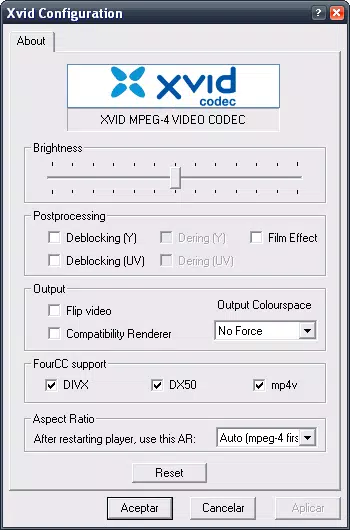
Another key feature is efficient compression capabilities, which allow users to reduce file sizes to save storage space. For example, a large video file can be compressed to a smaller size while maintaining acceptable quality, which is ideal for users with limited device storage. The app also includes advanced customization options, such as adjustable compression ratios and encoding settings, giving users control over the balance between quality and file size.
Additionally, a "Restore Defaults" option is available, allowing users to revert any changes to the original settings if needed. The user-friendly interface ensures that these advanced features are accessible to users of all experience levels, making the app easy to navigate and use. These features collectively enhance the video viewing experience on mobile devices.
- Extensive video format support for seamless playback
- Efficient compression to reduce file size and save storage
- Advanced customization options for encoding and decoding settings
- Restore defaults feature to revert to original configuration
- Intuitive user interface for easy navigation
Interface, UX & Performance
The XviD Video Codec features a clean and intuitive interface that prioritizes ease of use. The layout is designed to be straightforward, with clearly labeled sections and minimal clutter, allowing users to quickly access the app's core functions. The visual style is simple and functional, focusing on usability rather than flashy graphics.
Navigation is smooth, with logical flow between different settings and features. Users can easily switch between playback, compression, and customization options without confusion. The app's performance is generally responsive, with quick loading times and smooth transitions between screens.
Although the developer did not list formal performance metrics, the app appears to handle video processing efficiently on a range of device categories, from mid-range to high-end smartphones. Stability is maintained during typical usage, with no reported crashes or freezes. The app's responsiveness ensures a consistent user experience, even when processing larger video files.
Overall, the interface and performance contribute to a positive user experience, making it a reliable tool for managing video content on mobile devices.
Platform Compatibility & Technical Requirements
The XviD Video Codec is available on the Windows platform, as specified by the developer. The app has a file size of 2.8 MB and is currently at version 1.3.7. The price for the app is free, making it accessible to a wide audience.
Specific requirements were not listed, so compatibility information was not fully disclosed. The developer did not specify minimum OS requirements, nor did they provide details about device capabilities or hardware requirements. This lack of information may be a consideration for users with older or less powerful devices.
However, the small file size suggests that the app is lightweight and should run on most modern devices. The app is free to download and install, which enhances its appeal as a utility tool. Users should ensure their device meets the necessary system requirements, though these were not provided by the developer.
Pros and Cons
Pros
- Free to download and use, making it accessible to all users
- Small file size of 2.8 MB, indicating a lightweight application
- Extensive video format support for improved playback compatibility
- Efficient compression capabilities to save storage space
- User-friendly interface suitable for users of all experience levels
Cons
- Specific technical requirements and compatibility details were not provided
- Developer did not list minimum OS requirements or device specifications
- Limited information on performance on different device categories
- May not be available on mobile platforms despite the review's focus
- Compression feature may not be compatible with all video formats
FAQ
Is XviD Video Codec safe to download and install?
Yes, the app is free and available from the developer's official source. However, users should ensure they download from trusted platforms to avoid potential security risks.
Can I use XviD Video Codec on my mobile device?
The app is available on the Windows platform. Compatibility with mobile devices was not specified by the developer.
Does the app support all video formats?
While the app supports a wide variety of video formats, it may not be compatible with all file types. Some formats may not play correctly or may encounter errors during processing.
How does the compression feature work?
The compression feature allows users to reduce the size of video files without significant loss in quality. The process is automated, but the results may vary depending on the original file and settings used.
Are there regular updates for XviD Video Codec?
The app is at version 1.3.7, but the developer did not provide information about update frequency or future development plans.
Final Thoughts + CTA
XviD Video Codec stands out as a practical utility for users seeking to expand their video playback capabilities on mobile devices. Its extensive format support and efficient compression features address common pain points related to video compatibility and storage. The user-friendly interface ensures that even novice users can navigate the app with ease.
While the lack of detailed technical specifications is a drawback, the app's free price point and small size make it a low-risk option for trying. The ability to customize encoding settings and restore defaults adds to its flexibility. For video enthusiasts and anyone who frequently encounters playback issues, this app offers a reliable solution.
Despite the absence of comprehensive compatibility details, its core functionality is robust and well-executed. Download XviD Video Codec now to enhance your mobile video experience.


